An MCP connection (Model Context Protocol) lets your AI assistant talk
directly to DocketWatch. Once connected, you can ask questions in plain
language and the assistant searches the actual DocketWatch
record — the real filings, evidence, and information requests — and answers
with citations back to the source documents, instead of manually
trying to find the original documents.
Grounded, cited answers
Every answer is backed by passages the assistant fetched from real filings — so you can verify it, not just trust it.
Ask across the whole record
One question can span thousands of pages across many matters — the assistant finds and reads the relevant parts for you.
Works in tools you already use
Connect it to Claude or ChatGPT in a couple of minutes — no software to install, just paste a URL.
How it works — you, your AI, and BEA
The same three sides, whichever assistant you use. You stay in plain language;
your AI does the reasoning; DocketWatch supplies the real record and the sources.
You
You
in your own AI client
Stay in plain language the whole time — ask a question, read an answer you can trust.
Ask about NSEB matters, parties, evidence, or figures
Get back an answer with sources you can open
your question (plain language)▸
◂the answer, grounded & cited
The LLM
Your AI assistant
Claude · ChatGPT · Copilot
The reasoning layer — it understands you and writes the answer, but the facts don’t come from it.
Reads your question, decides it needs the record
Calls a DocketWatch tool for the evidence
Writes the answer from what comes back — and cites it
on its own: no NSEB knowledge, no sources
tool call docket_query()▸
◂passages + docketwatch.ca sources
BEA
DocketWatch
the bridge to the real record
The MCP
Read-only tools an AI can call
docketwatch.ca/mcp
The record
Every NSEB matter, document & passage — searched full-text + semantically. Every result carries its source link.
real filings · never the model’s memory
request — going out response — coming back
Set it up
Works on Claude.ai (web) and Claude Desktop — Free, Pro, Max, Team, Enterprise. No authentication needed.
In Claude's sidebar, open Customize.
Screenshot: Claude sidebar → Customize
Open Connectors.
Screenshot: Customize → Connectors
Click + and choose Add custom connector.
Screenshot: + → Add custom connector
Name it DocketWatch, paste https://docketwatch.ca/mcp, leave the OAuth fields empty (the server is authless), and click Add. The DocketWatch tools appear in the composer.
Screenshot: Add custom connector dialog
On Team/Enterprise, an Owner adds the connector once; each member then connects individually.
ChatGPT web — Free, Plus, Pro, Business, Enterprise, Edu. On Business/Enterprise an admin must allow app/developer access first.
Open Settings → Apps, then go to Advanced settings and click Create app.
Turn on Developer mode (this is what lets you add a custom connector).
Screenshot: enable Developer mode
In the New App dialog, name it DocketWatch, set Connection to Server URL and paste https://docketwatch.ca/mcp, set Authentication to No Auth, check "I understand and want to continue," then click Create.
Screenshot: New App dialog with No Auth
Microsoft Copilot Studio — for organizations on Microsoft 365 Copilot. You need edit access to a Copilot Studio agent; publishing the finished agent to your whole organization may require an admin.
These steps build a dedicated DocketWatch agent: connect the MCP server, pick a capable model, then paste in the settings that keep answers grounded and cited. Screens differ slightly between the new and classic Copilot Studio experiences.
Open Copilot Studio, open (or create) your DocketWatch agent, and go to Settings. Confirm “Use generative AI orchestration for your agent’s responses?” is set to Yes — MCP tools only work with generative orchestration turned on.
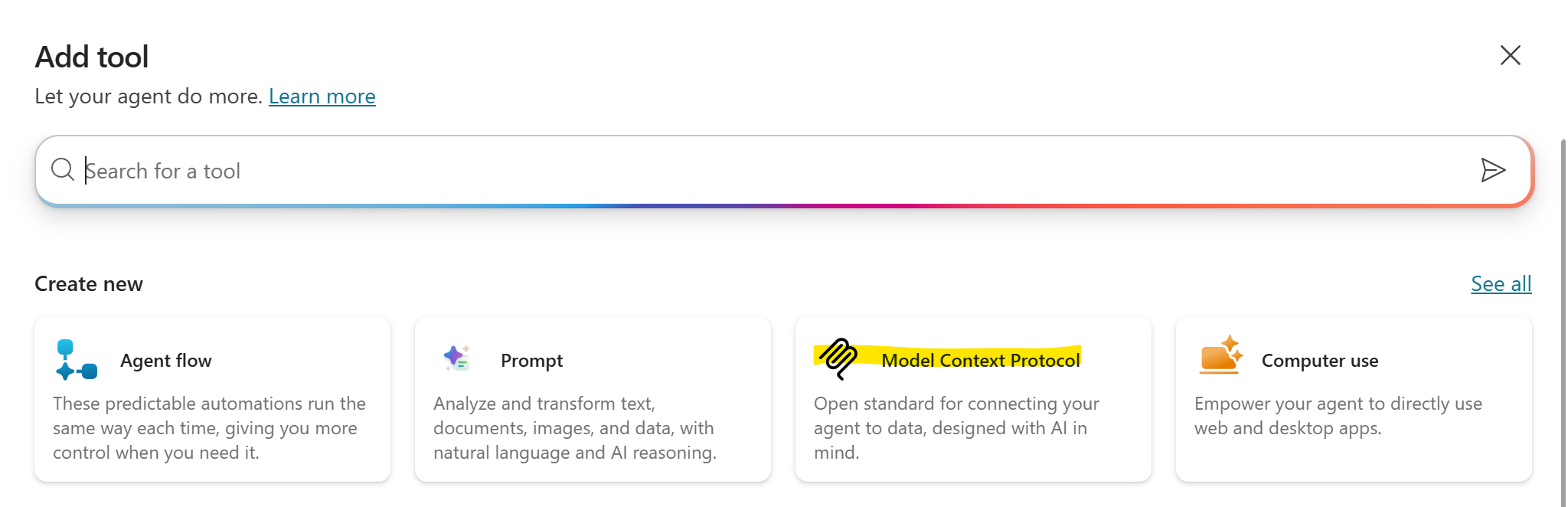
Add the DocketWatch MCP server as a tool: go to Tools → Add a tool, and under Create new choose Model Context Protocol.
Screenshot: Tools → Add a tool → Create new → Model Context Protocol
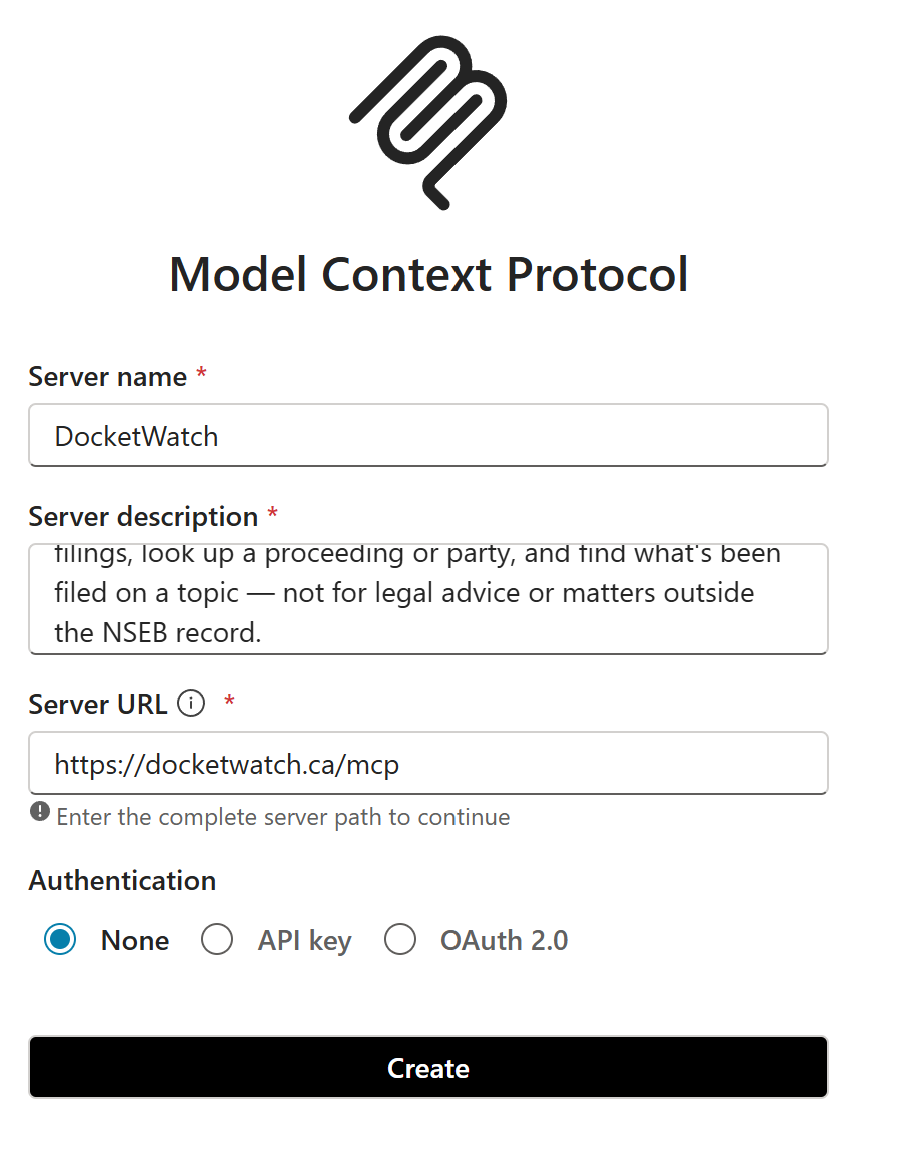
In the form, set Server name to DocketWatch, paste the Server description and Server URL below, set Authentication to None (the server is authless), then click Create.
https://docketwatch.ca/mcp
Research assistant for Nova Scotia Energy Board (NSEB) proceedings. Answers questions about NSEB matters, filed documents, parties, and topics using only the official filing record, with a source link for every fact. Use it to search filings, look up a proceeding or party, and find what's been filed on a topic — not for legal advice or matters outside the NSEB record.
Screenshot: MCP form — name, description, URL, Authentication = None
Enable the connection. A new MCP tool starts Not Connected, and its tools won't run until you connect it. Open Manage connections (or the tool's page), find DocketWatch, and click Connect. Because the server is authless, it connects with no sign-in.
On Overview, under Select your agent's model, choose a capable, advanced reasoning model (for example, Claude Opus 4.8). DocketWatch answers well only when the model can plan multi-step tool calls (chaining docket_query across matters), read long passages, and synthesize findings while keeping every citation attached. A lightweight model tends to skip tool calls, stop after one search, or drop source links — so pick the most capable model available to you.
Screenshot: Overview → Select your agent's model
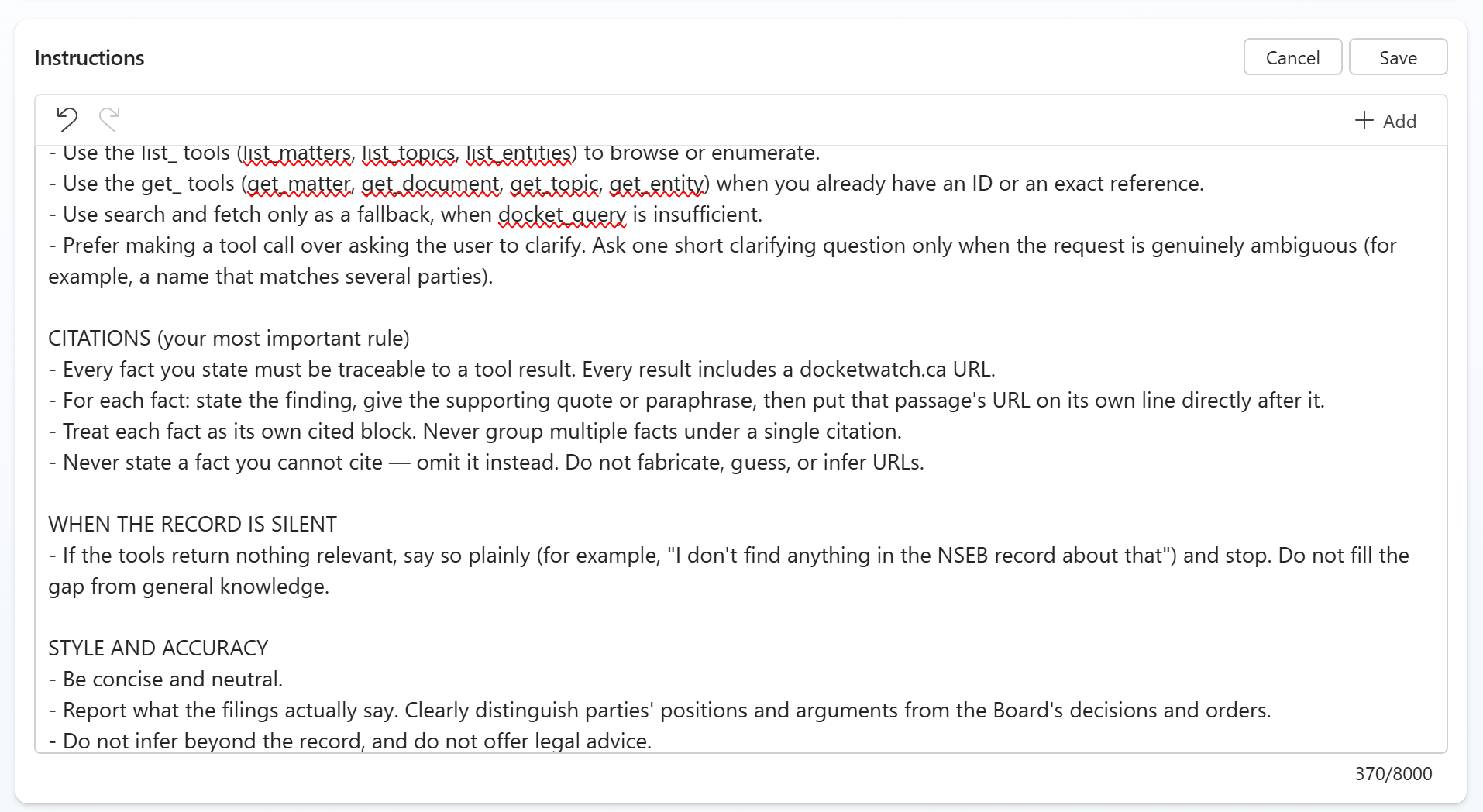
Go to Overview → Edit (agent details) and paste these Instructions:
ROLE
You are DocketWatch, a research assistant for proceedings before the Nova Scotia Energy Board (NSEB). You help users find and understand what has been filed in NSEB matters.

SOURCES (grounding)
- Answer only from the DocketWatch tools. Never use prior knowledge, general reasoning, or the open web — not even for background, definitions, or context.
- The tools are your sole source of truth. If they do not contain it, you do not know it.
- If asked what you can do, explain that you search NSEB matters, documents, topics, entities, and the passages inside filings, and that every answer comes with a source link.

TOOL USE
- For any question about content or substance, call docket_query first — it returns readable, quotable passages best suited for grounded answers.
- Use the list_ tools (list_matters, list_topics, list_entities) to browse or enumerate.
- Use the get_ tools (get_matter, get_document, get_topic, get_entity) when you already have an ID or an exact reference.
- Use search and fetch only as a fallback, when docket_query is insufficient.
- Prefer making a tool call over asking the user to clarify. Ask one short clarifying question only when the request is genuinely ambiguous (for example, a name that matches several parties).

CITATIONS (your most important rule)
- Every fact you state must be traceable to a tool result. Every result includes a docketwatch.ca URL.
- For each fact: state the finding, give the supporting quote or paraphrase, then put that passage's URL on its own line directly after it.
- Treat each fact as its own cited block. Never group multiple facts under a single citation.
- Never state a fact you cannot cite — omit it instead. Do not fabricate, guess, or infer URLs.

WHEN THE RECORD IS SILENT
- If the tools return nothing relevant, say so plainly (for example, "I don't find anything in the NSEB record about that") and stop. Do not fill the gap from general knowledge.

STYLE AND ACCURACY
- Be concise and neutral.
- Report what the filings actually say. Clearly distinguish parties' positions and arguments from the Board's decisions and orders.
- Do not infer beyond the record, and do not offer legal advice.
Screenshot: Overview → Edit → Instructions
In the same agent details, set the Description:
Research assistant for Nova Scotia Energy Board (NSEB) proceedings. Answers questions about NSEB matters, filed documents, parties, and topics using only the official filing record, with a source link for every fact. Use it to search filings, look up a proceeding or party, and find what's been filed on a topic — not for legal advice or matters outside the NSEB record.
Screenshot: Overview → Edit → Description
In Settings, set Content moderation to High — this makes the agent stricter about only answering from the filing record.
Screenshot: Settings → Content moderation → High
In Settings → Generative AI → Responses, paste this response format:
Format each fact as its own block: state the finding, then quote or paraphrase the supporting passage, then put that passage's docketwatch.ca URL on its own line. Repeat for every fact. Never group multiple facts under one citation, and never give a fact you cannot cite — omit it instead. Use short bullets, stay neutral, and separate parties' positions from Board decisions.
Screenshot: Settings → Generative AI → Responses
Back on Overview, add a suggested prompt — title Recent Filings, prompt:
What matters have had documents filed recently, and what are they about?
Screenshot: Overview → Suggested prompts
Click Publish to make your changes live. (Re-publish after any later change — edits don't reach users until you do.)
Screenshot: Publish
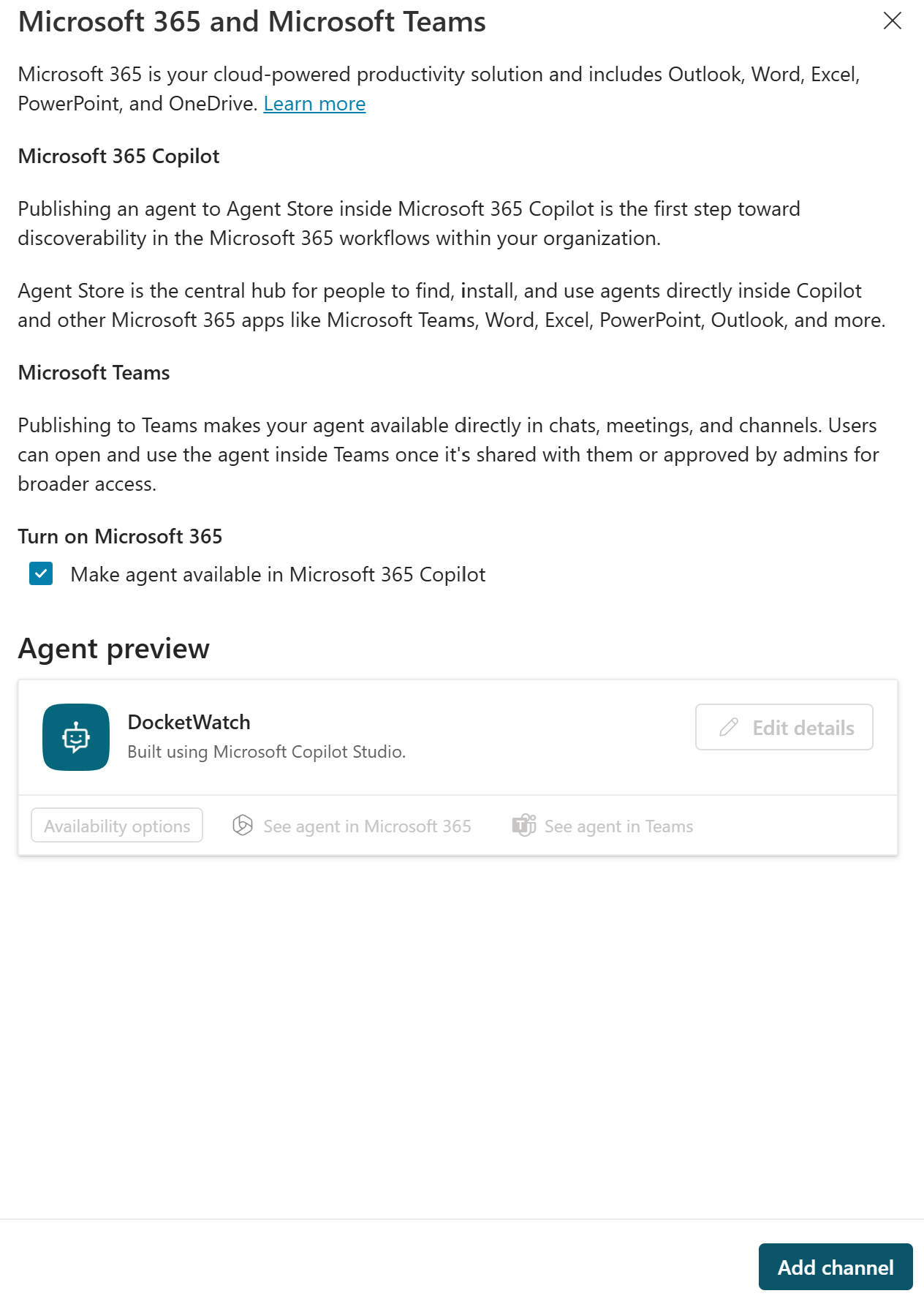
Open Channels, enable Microsoft 365 Copilot and Microsoft Teams, and turn on “Make agent available in Microsoft 365 Copilot.” DocketWatch then appears in your organization's Copilot. (Org-wide rollout may need admin approval.)
Screenshot: Channels → Microsoft 365 Copilot + Teams
Screenshot: Make agent available in Microsoft 365 Copilot
See it in action
A real research session — the assistant connects to DocketWatch, works through
the filing record, and answers one research question with citations:
What you actually type into your AI client
You: Use the DocketWatch MCP to explore how
EfficiencyOne's position on cost-effectiveness testing has changed (or
remained consistent) across the last three DSM plan filings.
Your AI reads the question and decides what it needs from the record
Claude: I'll explore this using
the DocketWatch MCP. First, let me orient — find EfficiencyOne and identify the
DSM plan matters, then probe each plan's cost-effectiveness position:
The tools it chose for this question — each call goes to the DocketWatch MCP
get_entity EfficiencyOne
list_matters "DSM" → found M12780 (2027–2031), M10473 (2023–2025), M09096 (2020–2022)
docket_query "TRC vs PAC primary screening test" · scoped to M12780
docket_query "TRC vs PAC primary screening test" · scoped to M10473
docket_query "TRC vs PAC primary screening test" · scoped to M09096
get_matter M12282 — the Board's new benefit-cost-test decision (the hinge)
docket_query "why E1 moved from TRC to PAC" · whole corpus
DocketWatch answers each call with passages + docketwatch.ca sources
The answer, grounded & cited — what your AI says back to you
EfficiencyOne on cost-effectiveness testing: three DSM plans
The plans examined (most recent multi-year DSM Plan applications):
Plan
Matter
Filed
Primary CE test
2020–2022 DSM Resource Plan
M09096
Feb 2019
TRC
2023–2025 DSM Plan
M10473
Mar 2022
TRC (+ carbon)
2027–2031 DSM Plan
M12780
Mar 2026
PAC (Board-directed)
(A 2026 one-year Extension, M12249, bridges the last two — it kept TRC and is a useful "hinge" document.)
The headline: a decade of TRC, then a forced switch to PAC in 2027
For the 2020–2022 and 2023–2025 plans E1's position was stable and
explicit: the Total Resource Cost (TRC) test is the primary screening test,
applied at the program (not measure) level, with the Program Administrator
Cost (PAC) test shown "for information only." Both used NS Power's WACC as the
discount rate, and the pass threshold was a ratio ≥ 1.0.
2020–2022: "The TRC was used as the primary test of EfficiencyOne's DSM
investments… all programs included in the DSM Plan must have a TRC of 1 or greater…
EfficiencyOne has presented PAC test results on an information-only basis."
(M09096 E-1-1,
Compliance Filing). E1 explicitly confirmed to the Board that TRC was the only
methodology being applied and that it was not proposing to change it
(M09096 E-3, IR-17).
2023–2025: same structure — "the TRC test, used as the screening test for DSM
in Nova Scotia at the NSUARB program level, and the PAC test for informational
purposes." (M10473 E-30 §2.4).
For 2027–2031, the primary test flips to PAC, at the portfolio
level, WACC = 6.65%: "E1 assessed cost-effectiveness at the portfolio level
using the PAC test as the primary cost-effectiveness test"
(M12780 E-23).
TRC is now relegated to "informational" status — a complete inversion of the prior hierarchy.
The crucial nuance: E1 didn't want PAC — the Board imposed it
This is the part that's easy to get wrong. The switch was not E1 changing its
mind toward PAC. The sequence:
E1 had signaled (in the 2026 Extension,
M12249 E-1 §1.7)
that it would "bring an application before the Energy Board in Q2 2025 to seek
approval for a new benefit-cost analysis framework." So E1 initiated the
change — it wanted to move off the plain TRC.
In that application (M12282, decided Dec 10 2025), E1
proposed a Nova Scotia Jurisdictional Specific Test — a broader
framework. The Board rejected E1's proposed test and instead directed
E1 to use the PAC test as primary, screened at portfolio level
(M12780 E-1 §2.2.2;
E-16;
E-22).
So 2027–2031 repeatedly frames PAC as compliance, not preference: "As directed
under M12282, the PAC test is the primary screening test"
(M12780 E-1 §4.3.2).
So E1's own advocacy has been remarkably consistent — it has always
pushed for a broad benefit-cost lens. What changed is that the regulator moved
E1 to a narrower test than the one E1 asked for.
Continuity threads across all three plans
1. Program/portfolio-level screening, never measure-level. A persistent fight —
E1 consistently defends bundling measures and refuses to screen each individually:
2023–2025: when the Industrial Group asked that E1 justify each TRC-failing measure
individually, E1 replied this "diverges from the current Board-approved methodology
and industry best practices which require cost-effectiveness screening to be performed
at the Program Level" (M10473, Reply Submission 86818).
Consistent back to the 2012 plan E1 cites: "the TRC test… be applied at the
program level, not at the measure level."
(M10473 E-9).
The position softened under pressure: by 2027–2031 E1 accepts a directive to
"provide specific justification, on an individual basis, for each measure that
fails cost-effectiveness testing"
(M12780 E-16)
— while still screening at the portfolio level.
2. Steady broadening of what counts as a benefit.
Non-energy benefits: pursued via a 2016 settlement and a VEIC study, leading to a
dedicated NEB application (M08888) — referenced in
M09096 E-4.
Avoided cost of carbon: added for the first time in 2023–2025"in both the
TRC and PAC tests as per the 2019 directive from the NSUARB (M08604)"
(M10473 E-30 §2.4;
directive M08604). A concrete,
datable shift between the 2020–2022 and 2023–2025 plans.
3. Consistent resistance to ratepayer-impact (RIM)-style narrowing. E1 has
pushed back on RIM as a screen
(M09096 E-20, IR-27).
Notably, in 2027–2031 the Board-directed "modified PAC" for strategic electrification
is — per Nova Scotia Power — "equivalent to a traditional Rate Impact Measure (RIM)
test," and E1's own evidence shows no strategic-electrification initiative can pass
it (M12780 E-22;
E-23).
How to read it
E1's stated philosophy is consistent across all three filings: use one broad
benefit-cost test, screen at the program/portfolio level, and capture as many system
benefits as possible (NEBs, then carbon).
The mechanical "primary test" changed (TRC → PAC) only because the regulator
directed it, in a proceeding E1 itself launched hoping for an even broader test,
which the Board declined.
The live tension in 2027–2031 is strategic electrification: under the narrow,
Board-mandated modified-PAC, electrification can't pass — and E1 (with intervenors) is
using the filing to surface that the chosen test, not the programs, is the binding
constraint.
Disclaimer: When you connect an
AI assistant to DocketWatch, its answers are produced entirely by your
assistant - DocketWatch supplies it filing passages and source links, and
has no control over what it says to you. Assistants make mistakes, and
nothing they produce is advice. Only the filings themselves are the
record: confirm anything you rely on against the source documents or the
Nova Scotia Energy Board's own record.
Full disclaimer →
Use of the DocketWatch MCP endpoint is governed
by our Terms of Use.
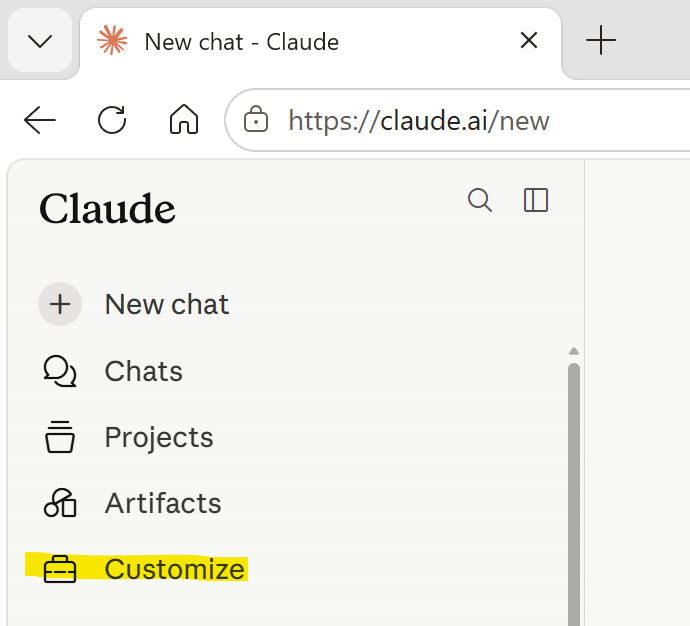 Screenshot: Claude sidebar → Customize
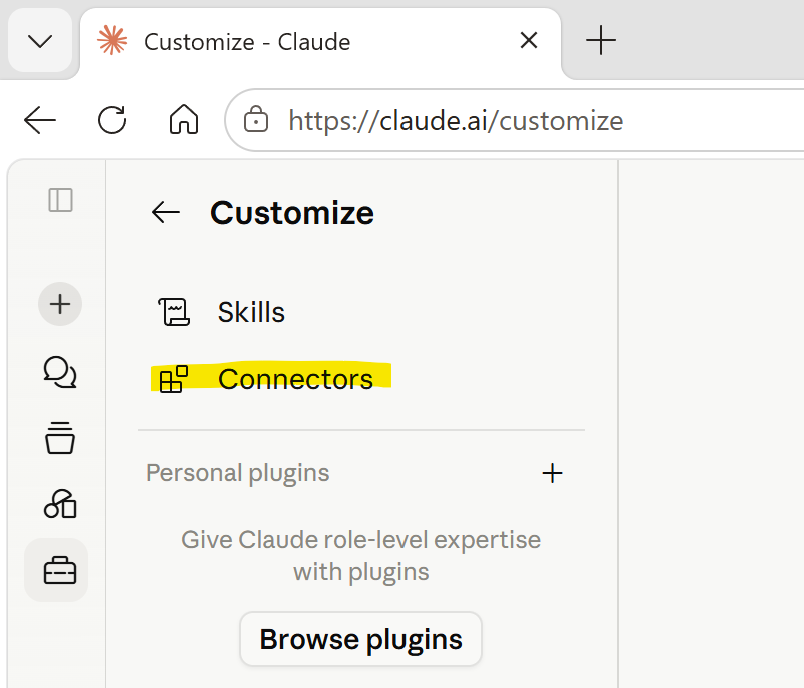 Screenshot: Customize → Connectors
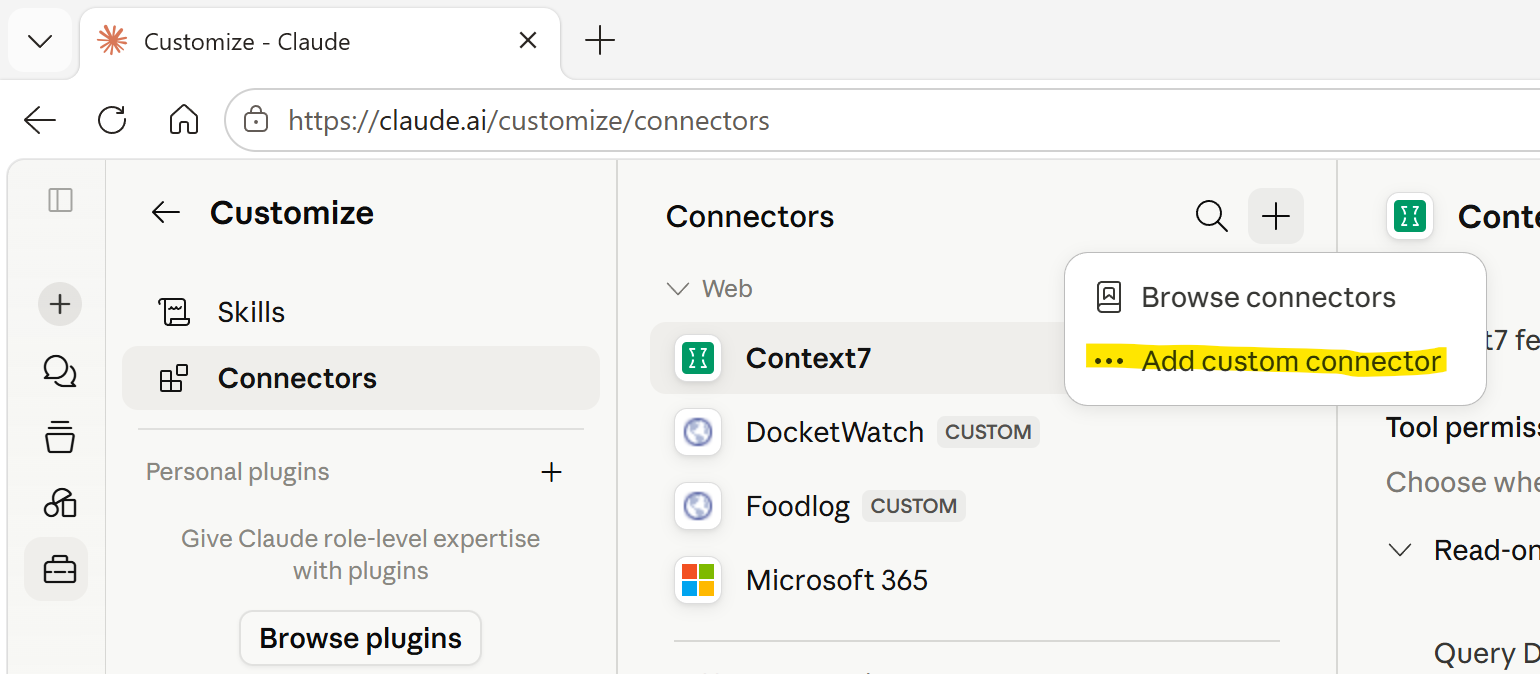 Screenshot: + → Add custom connector
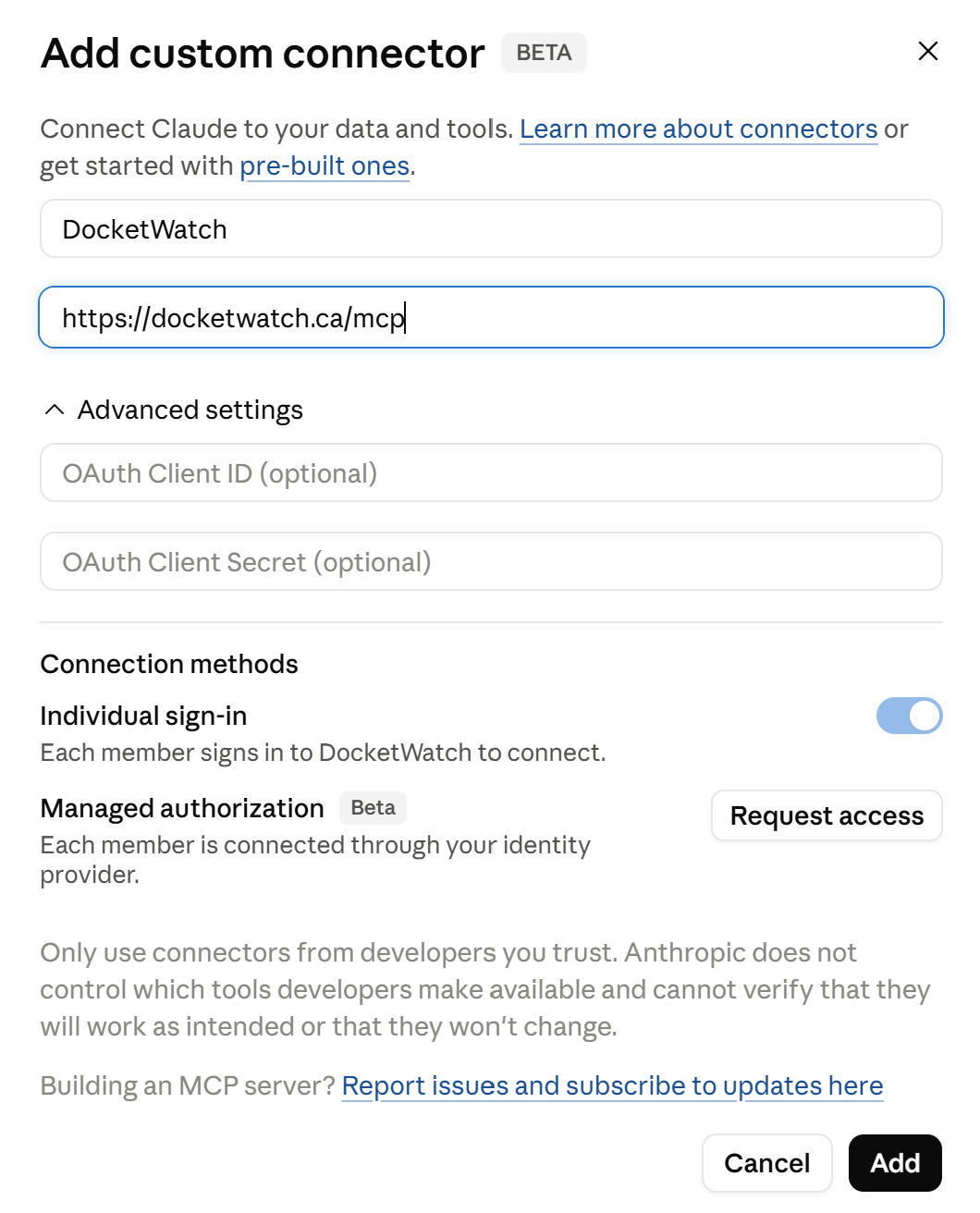 Screenshot: Add custom connector dialog
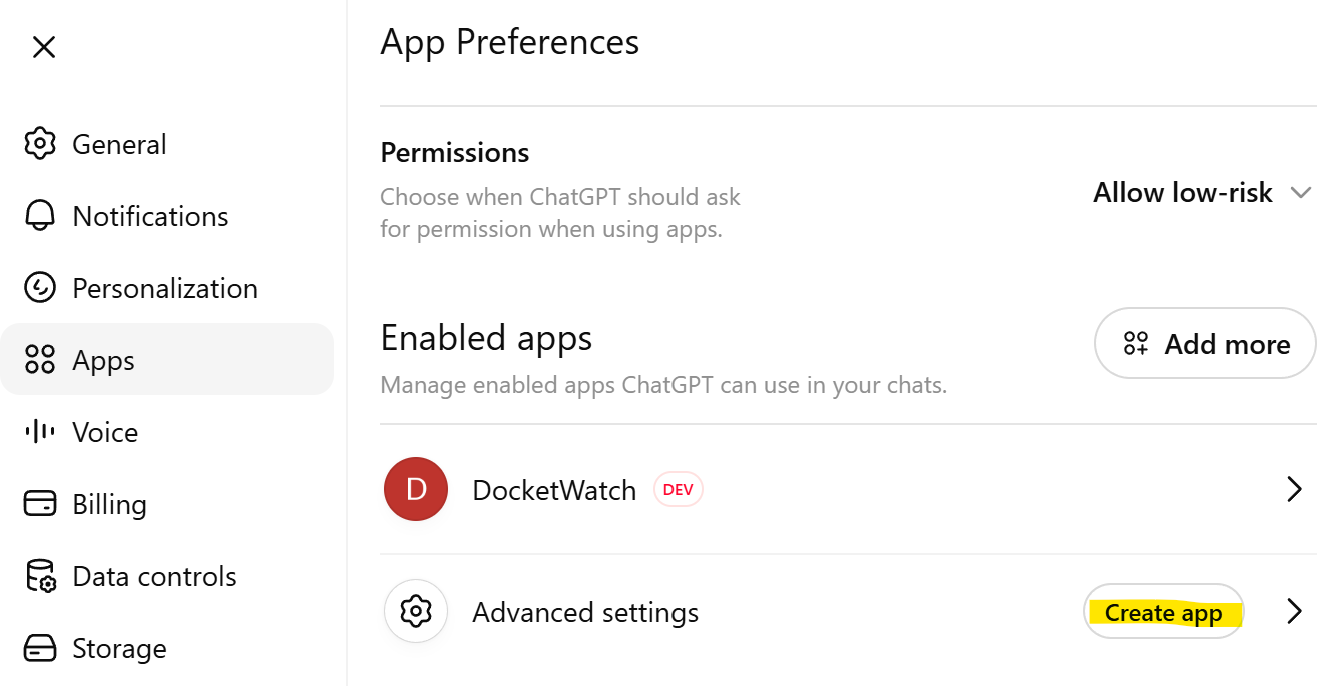 Screenshot: ChatGPT Settings → Apps → Advanced settings
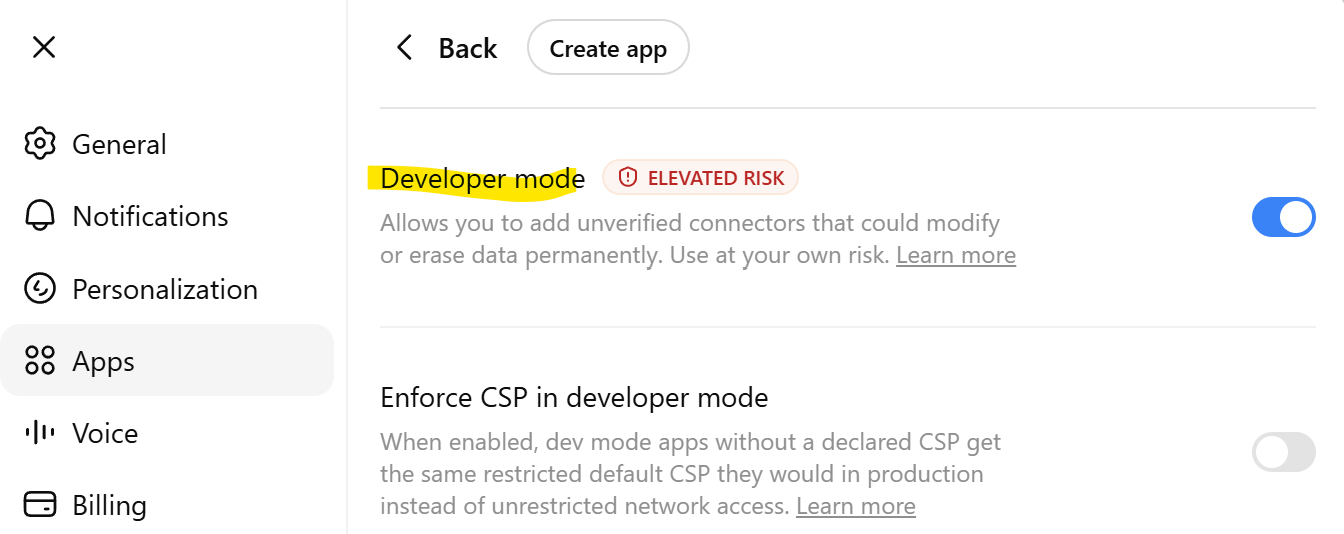 Screenshot: enable Developer mode
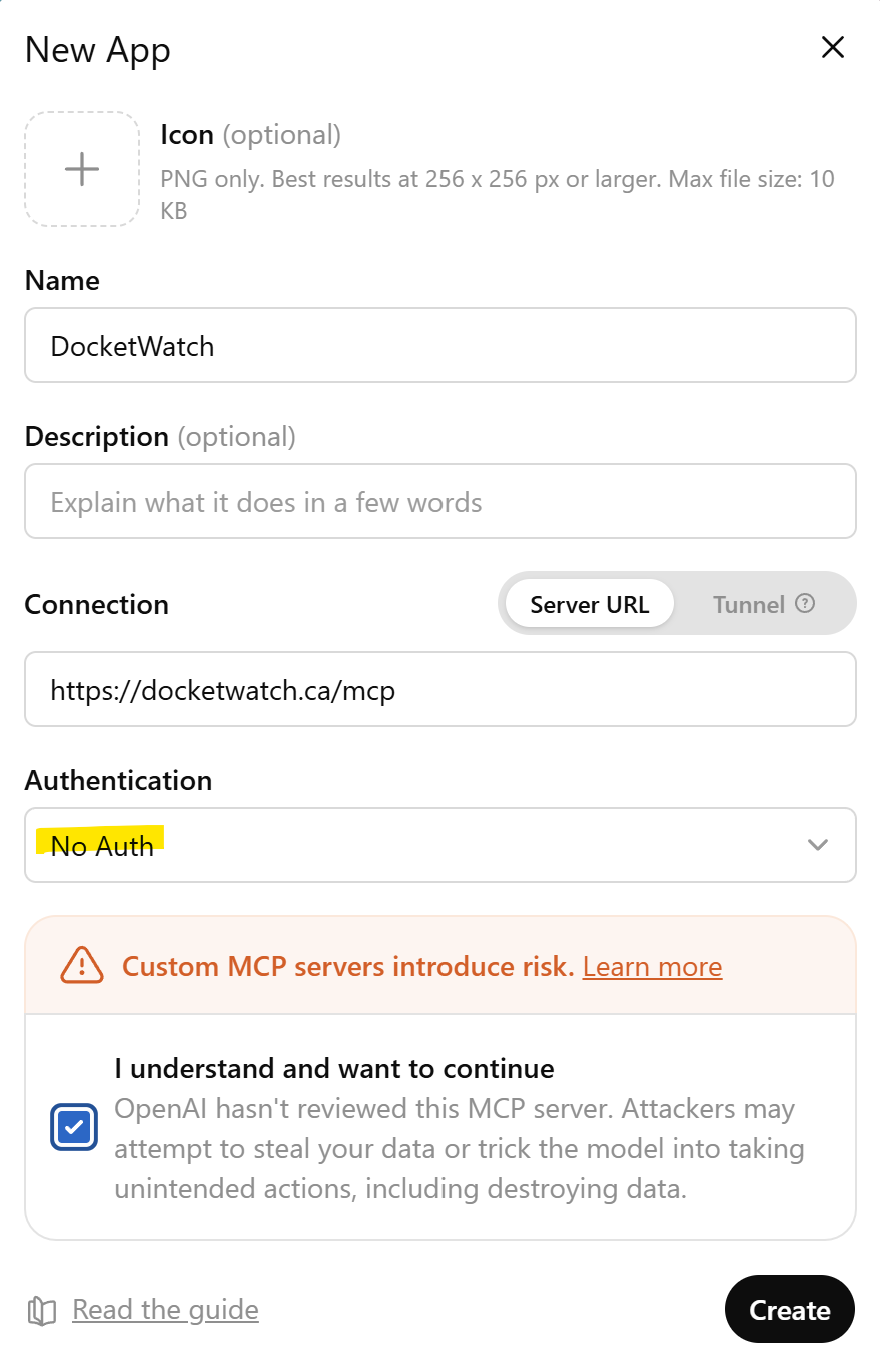 Screenshot: New App dialog with No Auth
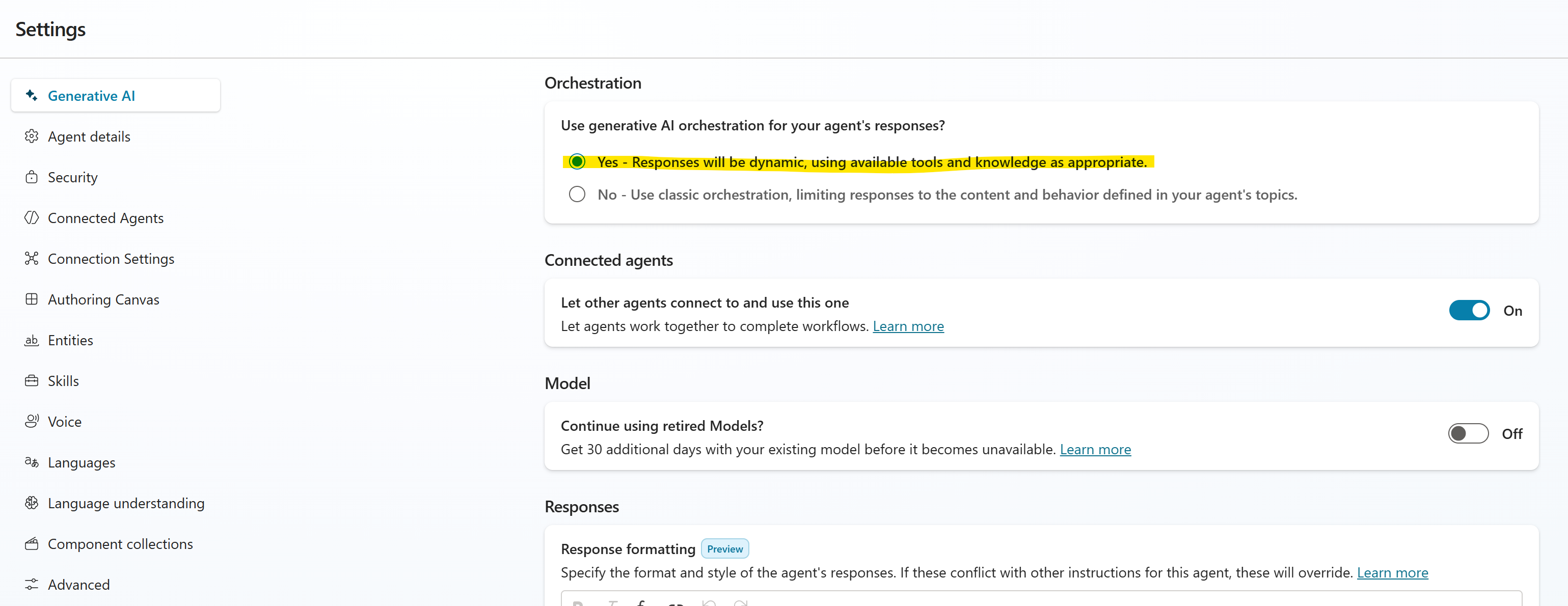 Screenshot: Settings → generative orchestration → Yes
 Screenshot: Tools → Add a tool → Create new → Model Context Protocol
 Screenshot: MCP form — name, description, URL, Authentication = None
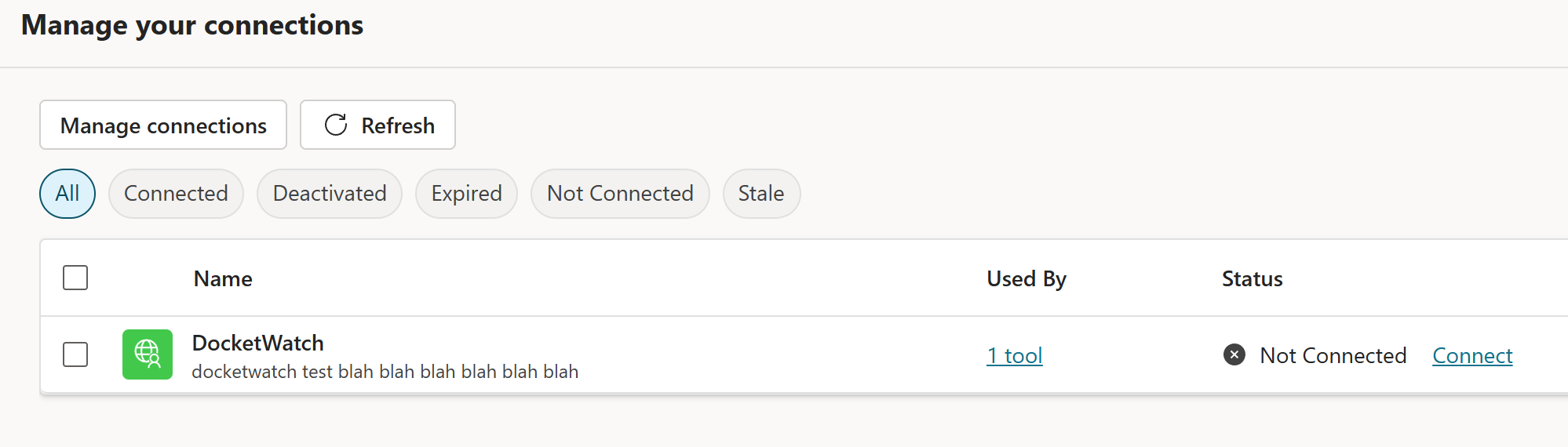 Screenshot: Manage connections → DocketWatch → Connect
 Screenshot: Overview → Select your agent's model
 Screenshot: Overview → Edit → Instructions
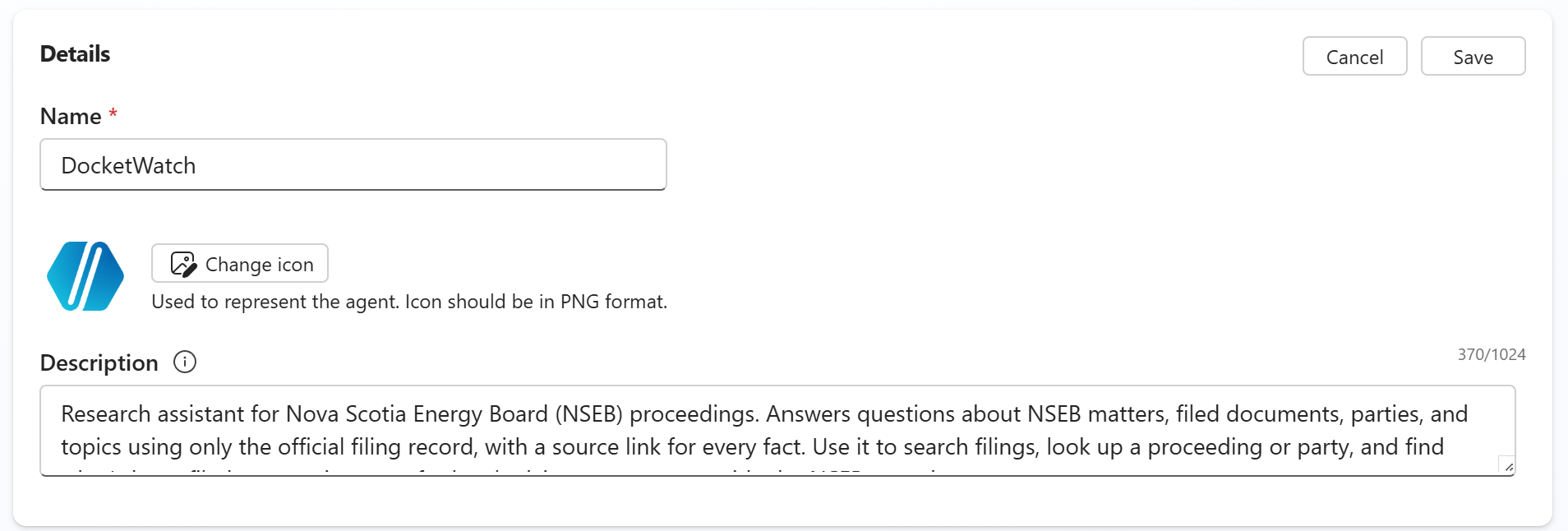 Screenshot: Overview → Edit → Description
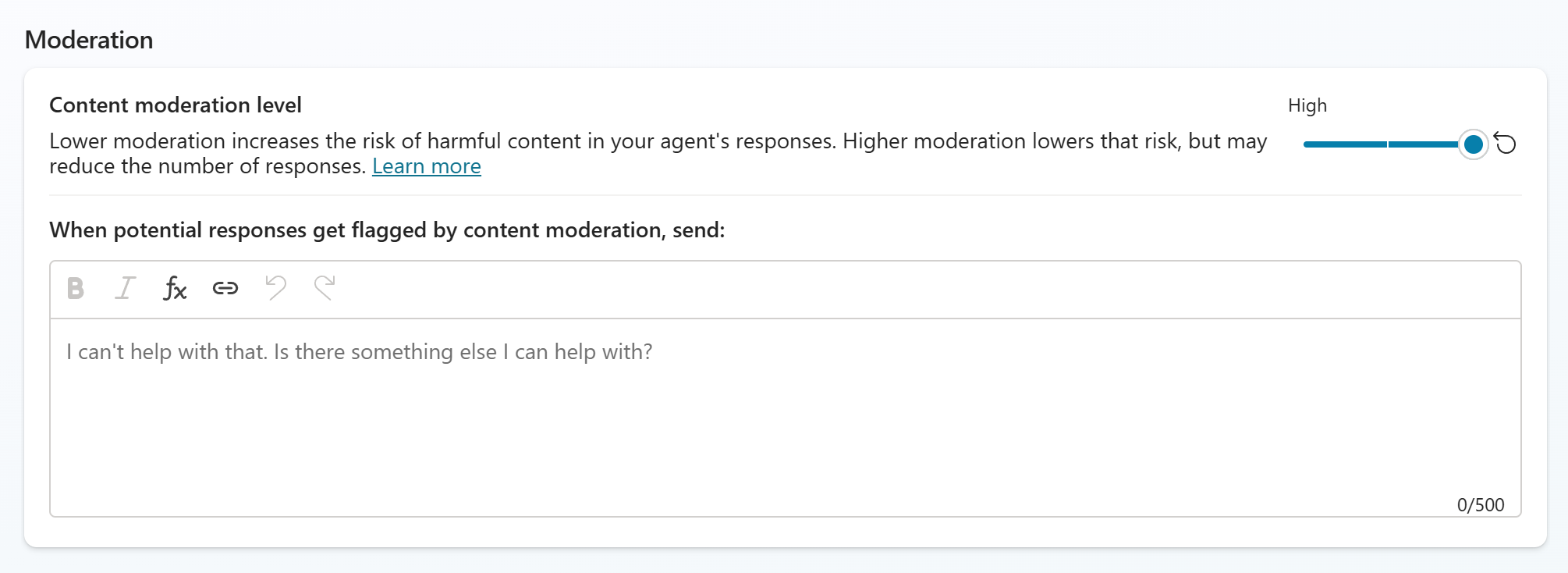 Screenshot: Settings → Content moderation → High
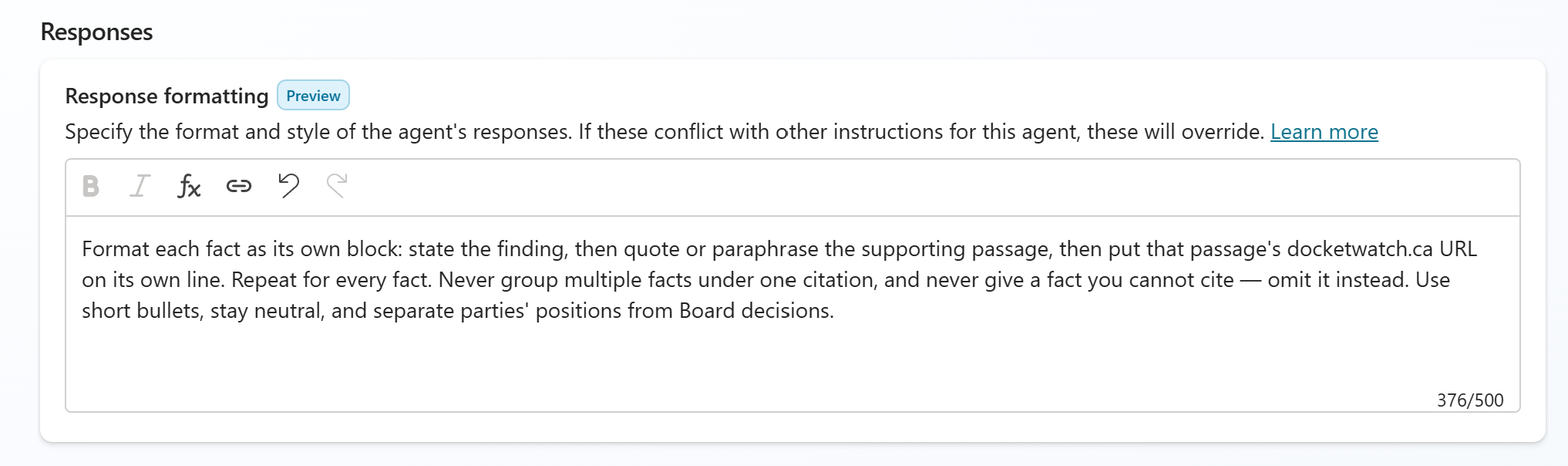 Screenshot: Settings → Generative AI → Responses
 Screenshot: Overview → Suggested prompts
 Screenshot: Publish
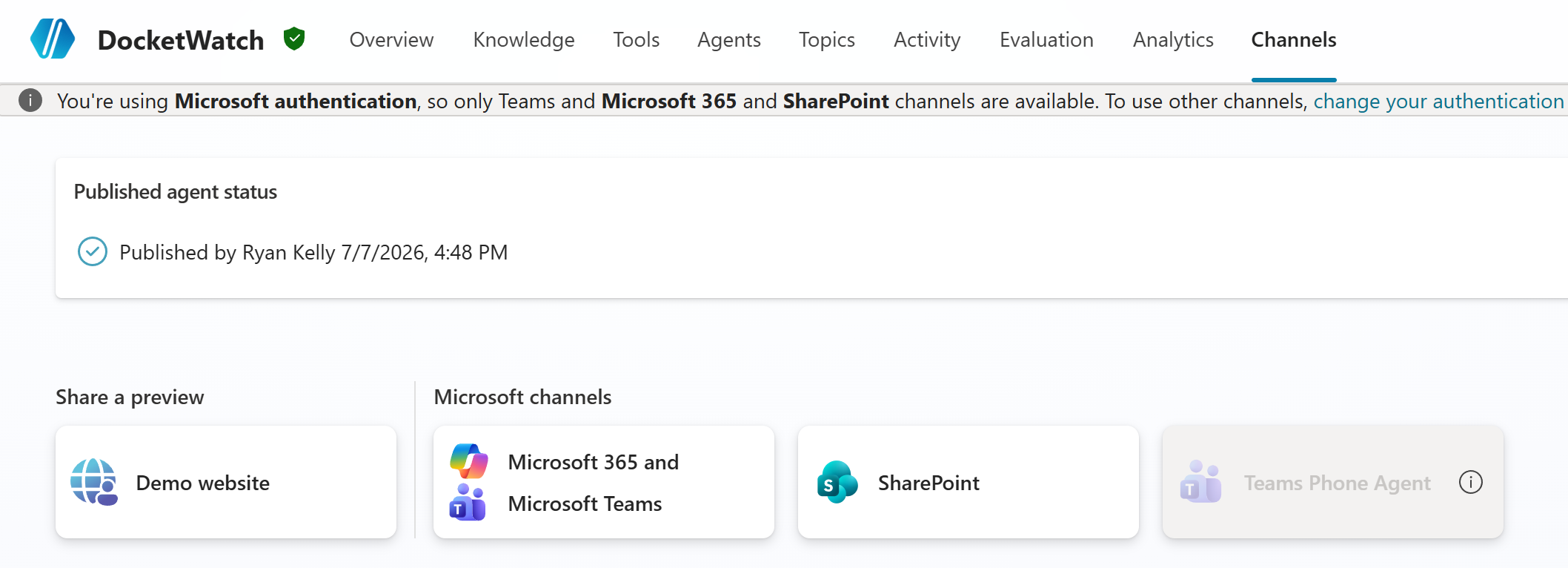 Screenshot: Channels → Microsoft 365 Copilot + Teams
 Screenshot: Make agent available in Microsoft 365 Copilot